Dial a picture - in seconds
by John Henshall

Kodak Picture Exchange software allows you to access seventeen international stock picture collections.
Working with Kodak Picture Exchange is easy and
converts what can be a daunting and time consuming into fun. It's not the
same kind of fun as curling up in a chair with a pile of catalogues to browse
through but, if your time is money, it could be much less frustrating. Picture
Exchange can take your most complex search parameters in its stride. It
can search not just one but seventeen libraries simultaneously. It can collect
all those images together and deliver them to you, wherever in the world
you are, within a few seconds. It works twenty four hours a day, seven days
a week, fifty two weeks every year without complaining or tiring.Kodak flew
in the software from Rochester to me at the EPIcentre for a live on-line
to KPX in the USA.
How do you find your picture? It's a surprisingly easy procedure.
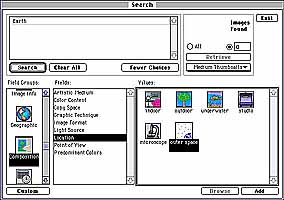
1. Log on to the Picture Exchange using your modem and personal computer
- from office or home. Kodak say that it will not work on a Macintosh PowerBook
but, never liking to take "no" for an answer, I tried and succeeded
in doing just that. That means that I could access KPX from anywhere -
including my clients' office. When you've logged on you may enter your project
job number to ensure that you bill the time to the correct client.
2. Describe the image you are looking for. Ask the PX to search. If there
are too many images for you to assimilate, narrow down your choice by refining
your search description. For example, search only for outdoor locations
in the sun.

3. Retrieve thumbnail images direct onto your screen. These appear, as
if by magic via your normal telephone line, within a few seconds. Use these
images to select just the image you want, then select the "design proof"
option.

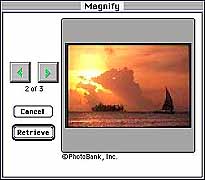
4. Order your selected design proof and download it over your telephone
line. A small charge is made for this: the images I downloaded cost US$21
each, plus a modest Kodak service fee of US$9 each. Import this image into
your layout to check that it works.

5. Finally, order the reproduction quality image - again from your
desktop. Negotiate usage fees direct with the provider and you're all set!
For the moment, the image will come to you physically: by one of the established
courier methods, or even by mail.
What do you need to do all this? A super-computer,
maybe? No. Just your normal Apple Macintosh (sorry Windows users, you'll
come later), a IIci or greater with 8mb RAM, System 7.x, a 24 bit colour
display (though 16 bit would probably do fine) and a hard disc with about
20mb free space. Design proofs can be saved in PICT format and images will
be able to be imported in Photo CD, PICT or TIFF formats. On the telecommunications
front you need a fast modem - preferably 14400 Baud but certainly no
less than 9600 Baud. Frequent and heavy users will certainly wish to upgrade
to ISDN lines.
The uses for similar on-line still and moving image libraries extend far
wider, from searching for locations for movies, to police and military uses.
When Picture Exchange becomes widely used it will become an awsome world-wide
mega picture library which will doubtless change the way the editors of
tomorrow source their images.

