GREENLAND'S ICY MOUNTAINS REVEALED
- DIGITALLY
How digital image enhancement improved photos taken through aircraft windows
by Captain Dave Pattison
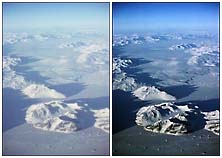
LEFT: the original 35mm Kodachrome transparency lacks definition
and saturation. In fact it looks just as you might expect from a shot taken
through an aircraft window at 35,000 feet.
RIGHT: the same shot after digital manipulation. By selectively adjusting
the saturation, gamma and sharpness, the picture springs into life.
Many pilots are keen photographers and always
carry a camera with them on trips. Like many pilots I have a large collection
of photos; some I am rather proud of and some I know I should have junked
years ago. You probably have some too. It's always difficult to trash pictures
that are almost right - you think to yourself that if only some aspect of
the shot had been better, it would have made a great photograph. In the
back of your mind you harbour a hope that one day, when you have the time,
you will do something with them. Well, that day is closer than you might
think!
For example, I have always been disappointed by my attempts to take photographs
through aircraft windows - even the supposedly optically true flight deck
windshields. The reasons are not hard to figure out. Apart from the problems
of shooting through at least six or seven miles of atmosphere, there are
the added complications of trying to take pictures through just about the
soggiest photographic filter ever designed. About one and a half inches
of multi-layered glass and acrylic, a microscopic coating of gold film and
the distortion of the screen due to aircraft pressurisation, makes taking
decent photographs nigh on impossible.
Over the years, despite the drawbacks of photography through the 'optical
soup' of the flight deck window, I have taken quite a few shots from the
air. I must admit they're not exactly of the highest technical quality,
but I've held on to them nevertheless, in the hope that someday something
could be made of them. As I shall explain, for me that someday has finally
arrived.
One of the sights I have often tried to capture
on film is the coast of Greenland, which is sometimes visible on northerly
crossings to the USA and Canada. Unfortunately, the passengers hardly ever
get to see this amazing coastline because at this stage of the flight the
window blinds are down and the movies are running. More's the pity because
it is a truly amazing spectacle. Frozen sea, icebergs, deep fjords, glaciers,
jagged mountains, ice deserts and nunataks make this a place like nowhere
else on Earth. Better than any movie.
Until fairly recently, photographers had to rely upon the skills of talented
darkroom technicians to rescue their flawed pictures. With the advent of
digital imaging, all that has changed, even for the amateur. Now any photographer
with a computer can easily manipulate and enhance pictures, even beyond
what was previously possible in the darkroom. It was to this technology
that I turned in an attempt to rescue some of my shots of Greenland.
Basically, all that is required is to get the picture into a form that a
computer can handle - and that means digital. High quality digital (filmless)
cameras are becoming available; they are expensive, but no doubt prices
will fall eventually. In the meantime, a 'normal' film image can be digitised
by scanning it from a negative, transparency or print. Alternatively, your
photographs can be transferred from film onto Photo CD. Each Photo CD holds
at least 100 images. There are many bureaux offering this service, and it's
also available at many labs at the time of getting your film developed.
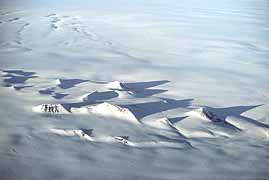
Nunataks. Jagged mountain tops protruding through thousands
of feet of solid ice.
Once in the digital domain, anything goes. With
the help of some very clever software the image can be manipulated in very
much the same way as a darkroom technician would, except that no darkroom
is needed - all the work is done in real time on your computer monitor.
At the click of a button it's possible to adjust the saturation, hue, contrast,
brightness, sharpness, colour balance, remove dust and scratches and do
a great deal more besides. And it's just as straightforward to apply special
effects to the image. It really is easy, and anyone can do it. Experience
and a 'photographic eye' do help of course, but there are no hard and fast
rules; it's simply a matter of experimenting with the various tools and
filters until things look right. Even in these days of high-tec computerised
photography, it's nice to know there is still no substitute for the Mk.I
eyeball.
If you need a print and true photo-realistic quality is required, the computer
file can be sent to a bureau for printing. However, many home computer printers
are quite capable of producing prints of at least good proof quality.
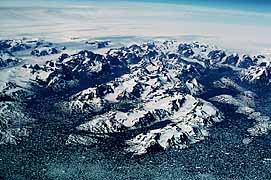
Eastern Greenland's fjords and mountains appear sharp and
crisp after digital enhancement using Adobe Photoshop
The accompanying pictures started life as 35mm Kodachrome
transparencies, all taken through aircraft windows from high altitude. I
scanned them on a Kodak RFS 2035 Scanner, and the enhancement was done using
Adobe Photoshop on an Apple Macintosh LC475 computer with 20Mb of RAM and
a 160Mb hard drive. The results are way beyond what I could have achieved
in the darkroom - and these are amongst my first attempts at digital imaging.
Of course, the power of digital imaging is not restricted to rescuing soggy
snapshots. The technique is being increasingly used by professionals as
a more creative (and less polluting) alternative to chemical photography.
And when it comes to restoring treasured but damaged family photos, removing
scratches and blemishes, correcting colour casts, adding or removing people
from pictures and so on, digital imaging has all the answers. There can
be little doubt that in the not too distant future, all photography will
be digital and film will be a thing of the past.
Many flight crew members regularly use home computers, and you only have
to peruse the pages of the Log to realise that many have considerable photographic
talents. If you're like me, you probably have drawers full of pictures which
don't quite make the grade. Nowadays, for a fairly modest outlay you can
purchase a good scanner - complete with software - hook it up to your PC
or Mac, and start turning out professional results.
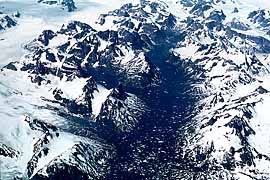
This article first appeared in "The Log" - the
journal of the British Airline Pilots' Association - August 1995.
IMPORTANT NOTICE
This document is Copyright ©1996 Dave Pattison. All rights reserved.
This material may only be downloaded for personal non-commercial use. Please
safeguard the future of online publishing by respecting this copyright and
the rights of all other authors of material on the Internet.
 to Dave Pattison

